Guides · Getting found · 5 of 12
Why your app ranks differently in every country's App Store
Each country's App Store has its own search results, so a rank at home says little about the next country. Why they differ, and how to check another store.
Your app sits near the top for its main search at home. A friend in another country types the same words and cannot find it. Nothing is broken. Each country has its own App Store, with its own search results, and your position in one says nothing certain about another.
Why does my app rank differently in other countries?
Because a rank is always a rank in one country. When you search, you search the App Store of the country your Apple Account belongs to. Someone in Germany searching “habit tracker” gets the German store’s results. Someone in Canada gets Canada’s. Apple works each list out separately.
One developer on Apple’s forums asked why users in Canada could not find their app.
What differs from one country to the next
Several things change at the border, and each one can move your position:
- The other apps. The apps beside you differ by country. A local app can hold the top of a search in its home country and be absent everywhere else.
- What people type. Shoppers in each country type their own words, in their own language. The search box’s completions differ from store to store.
- Your listing’s language. In App Store Connect (Apple’s website for managing your apps), you can write your name, subtitle and keyword field in more than one language. Apple documents which language each country’s store shows. A country whose shoppers see a listing in a language they do not search in has fewer words to match.
- Your ratings. Apple’s help says a rating belongs to the country or region where the customer first got the app. Your star average and your rating count differ by country too.
Apple does not publish how much each of these counts. What anyone can see is the result: the same search, in two countries, with two different lists.
What is normal: first place at home and nowhere a border away. That is common for a new app, and it says nothing about the app’s quality. It says where its ratings, its words and its shoppers are.
Your app appears where it is on sale
Before reading a rank in another country, check that the app is sold there. In App Store Connect, open your app and look at Pricing and Availability. The countries listed are the only stores where a shopper can find your app at all. Why your app doesn’t show up has the rest of that checklist.
How to look at another country’s store
The store you see on your iPhone or Mac follows your Apple Account’s country. Apple lets you change that country in your account settings, and its support pages list what has to be settled first, such as running subscriptions and store credit. For a quick look, that is too much.
Three lighter ways:
- Your store page in a browser. Open your app’s address with the country’s two-letter code after apps.apple.com, for example apps.apple.com/de/app/id1234567890 for Germany. A store page shows your listing as that country sees it: its language, its price, its ratings. It does not show search results.
- Someone in that country. Ask a friend, a tester or a customer there to run your three main searches and send a screenshot of the results.
- Apple’s public search address. Anyone can open it in a browser, for example https://itunes.apple.com/search?term=habit+tracker&country=de&entity=software&limit=200 for “habit tracker” in Germany. Change the words after
term=(a plus between words) and the two letters aftercountry=. It answers in a raw list written for programs, and the app names in it are readable: search the page fortrackName. The order is the order Apple’s public search returns for that country, and your app’s place in that list is its position in Apple’s public search. If your app is not in the list, it is not in the first 200. The App Store app on a phone personalizes some results, so a shopper there can see your app in a different position. Compare the two once, with a search on a phone in that country, and you know how closely they run.
Which countries to watch
Not every country deserves a daily look. Three kinds do:
- Where your downloads come from. App Store Connect’s Analytics breaks downloads down by country. The top three or four are your real markets.
- Where you have a listing in the language. If you wrote a German listing, watch Germany, Austria and Switzerland, so you can see whether the words you wrote are found.
- Where a competitor is big. If an app you compete with does well in one country, that country is where shoppers already look for what you make.
Do this today
Take your three main searches, the ones you most want to be found by.
- Write down your position for each one in your own country’s App Store, with today’s date.
- Pick two more countries: your biggest market from App Store Connect’s Analytics, and one country where you sell in another language.
- Get the same three positions there, through a friend, a tester or a customer you can ask. When nobody there can be asked, open Apple’s public search address for each search and count down to your app.
- Put the nine positions in one table. Where a search is high at home and missing abroad, read the first five apps in that country’s results. They show you who you are up against there.
In ASOblick
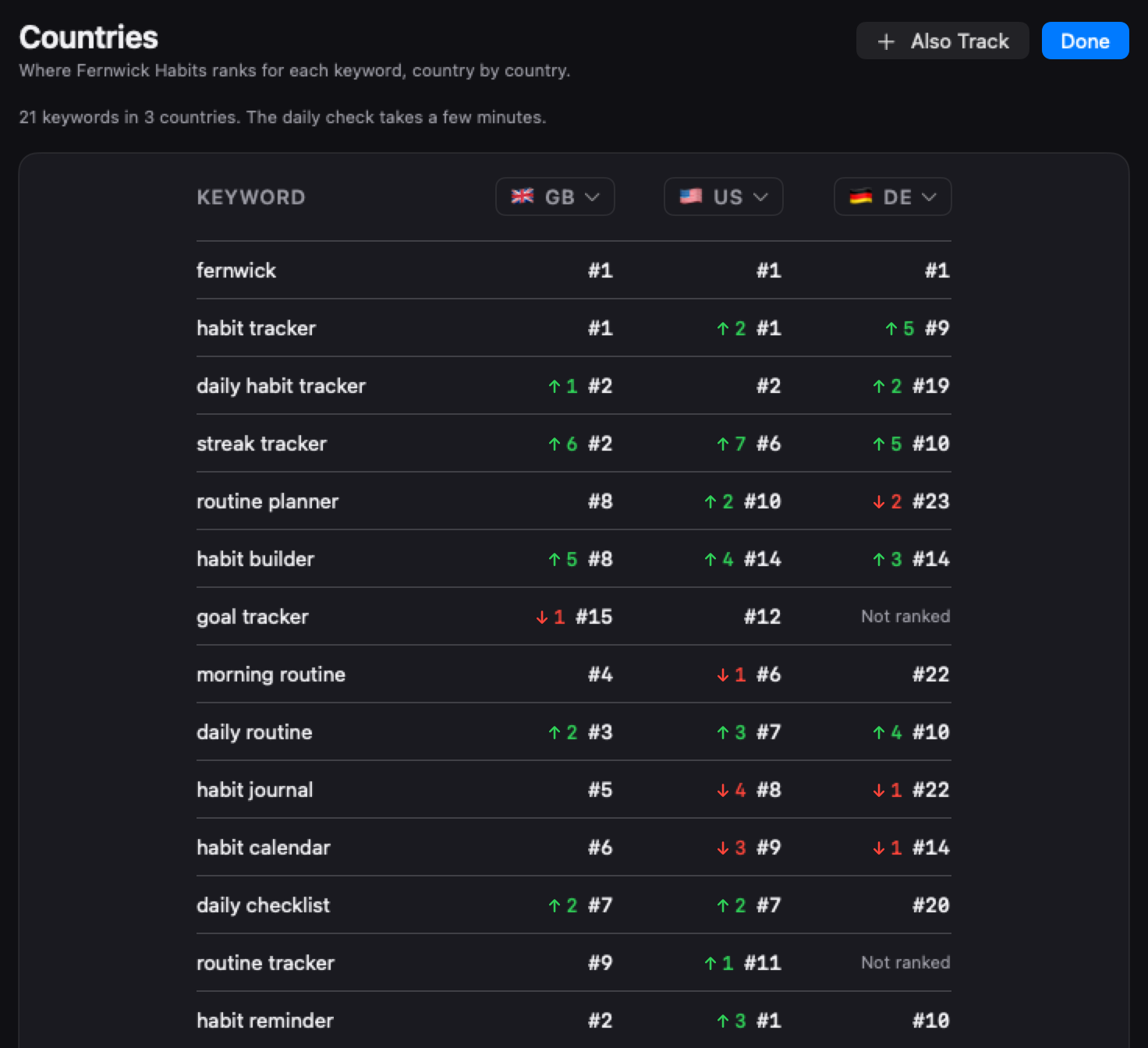
ASOblick lists all 175 countries and regions App Store Connect sells in, grouped the way App Store Connect groups them: the United States and Canada; Europe; Asia Pacific; Latin America and the Caribbean; and Africa, the Middle East and India. You add a country from the flag menu in the Keywords title bar, and its first check runs right away. From then on, every keyword is searched in every country you added, every day, with a full reading in each, through the same public search the address above answers. A shopper’s phone can show your app in a different position, because the App Store app personalizes some results. Before you add a country, ASOblick tells you how long the daily check will take with it, such as “about an hour”, and it spaces its searches three seconds apart so Apple keeps answering. The countries view puts your position for each keyword in each country side by side, with how many places it moved between the two most recent checks. ASOblick’s Competitors module shows the searches where each competitor ranks above you, and since when.
Free in one country; Pro, Max and Agency check every country you choose.
Next on the path: What your App Store screenshots should show, and in what order