Guides · Getting found · 4 of 12
How long App Store Optimization takes to move your rankings
New keywords go live with your next version, then positions move for weeks. How to tell a real climb from the two-place wobble every keyword has.
You rewrote your name, subtitle and keyword field, the version went live, and your positions look the same. How long it takes has two answers, because there are two waits, one after the other. Most of the frustration comes from mixing them up.
How long does it take for new keywords to show up in the rankings?
The first wait ends when your new text is live. The second is the time positions take to move once it is. Neither has a number Apple publishes, and each has a shape you can plan around.
The first wait: your next version
Your app name, your subtitle and your keyword field belong to a version. You edit them in App Store Connect (Apple’s website for managing your apps), you save them, and the store does not change. They go live when the new version does, after review.
Apple’s App Store Connect help says that changes to app information can take up to 24 hours to appear on the App Store. Count that day in too.
So keyword work is release work. Gather candidates while the current version is out. Rewrite the three fields once, and ship them with the build you were going to submit anyway. A change made in a hurry stays until the release after it, so an hour of thought before typing is cheap.
The second wait: days and weeks
Once the new text is live, your position for a search does not land on a final number and stay there. It moves.
Days and weeks is the range for reading a change. Not minutes, and not one morning. Apple does not publish its own timing. And every app you compete with is updating, rewriting its listing and gaining ratings while you watch. Your position is a place in a moving field, not a score you earn once.
What is normal: a keyword moving two or three places between days with nothing changed. Slipping three places overnight happens. Gaining four does too. Neither one is a result.
Two more things move positions in the same weeks, and both are easy to mistake for your change:
- A new app settling in. In its first weeks a new app can appear, vanish and reappear for the same search while search catches up with it. Why your app doesn’t show up covers that stretch.
- The other apps. A competitor’s new version, a price change or a feature by Apple can land in the same week as yours. The numbers after your release show what came after it. They never show why.
Why a history beats a snapshot
A search by hand tells you about today. One number cannot tell a real climb from ordinary movement, because both look the same in a single reading.
A run of daily readings turns the same searches into something you can act on. Two weeks of one keyword shows whether the line goes up, goes down, or sits still. It also shows how much the keyword moves on its own. Once you have watched a word bounce between 20 and 26 for two weeks with nothing changed, a move from 23 to 21 stops being news.
A history has to be collected before you need it. The day you ship a rewrite is the day you want four weeks of before to compare against. Nobody can collect those weeks afterwards. Either a reading was written down each day, or it does not exist.
A rhythm that keeps your listing steady
- Read daily. A glance at the positions, not a session. You are building the record, not deciding anything.
- Judge weekly. Once a week, read the lines instead of the numbers. Which words are going up, which are flat, and which have not moved since you added them?
- Change with a release. Rewrite the three fields when the last change has had a few weeks to show something. A rewrite every week leaves you no stretch long enough to read.
A keyword you are far from winning does not get closer by waiting. If the first screen of results is full of apps with tens of thousands of ratings, three months will not change that. The rhythm shows you which words are worth the wait and which to replace. How to pick keywords covers how to judge a word before you spend characters on it.
Do this today
Start the record yourself. It takes ten minutes a day.
- Pick five keywords you care about.
- Make a table: one column per keyword, one row per day, with the date in the first column.
- Today, search each keyword in the App Store and count down the results to your app. Write the position in its cell. If the app is not on the first few screens, write “not found”.
- Do the same five searches every day for 14 days, at about the same time.
On day fourteen you have 70 readings. Each keyword has a line, and you can see how far it moves on a day when nothing changed. That table is the work: a dated reading per keyword per day, kept before you need it.
In ASOblick
ASOblick takes over that table. Every keyword you track is searched every day, in every country you chose, and your position is written down. Beside each keyword, the 14 Days column draws one bar for each day: a taller bar is a better position, a small gray stub is a day your app was past the first 200 results, and an empty slot is a day with no check. A day with no check is never drawn as a drop. Click a keyword for its full chart, where a day with no reading is a grey band and the line under the chart names the day and says whether ASOblick was running on your Mac. ASOblick looks every 15 minutes for checks that are due. If your Mac sleeps through a due check, the check runs the moment the Mac wakes. If it was shut down, the check runs when ASOblick next opens, and a day it never ran stays an empty slot. Every reading is kept on your Mac from the first day, so a change you make in six months can be read against everything before it.
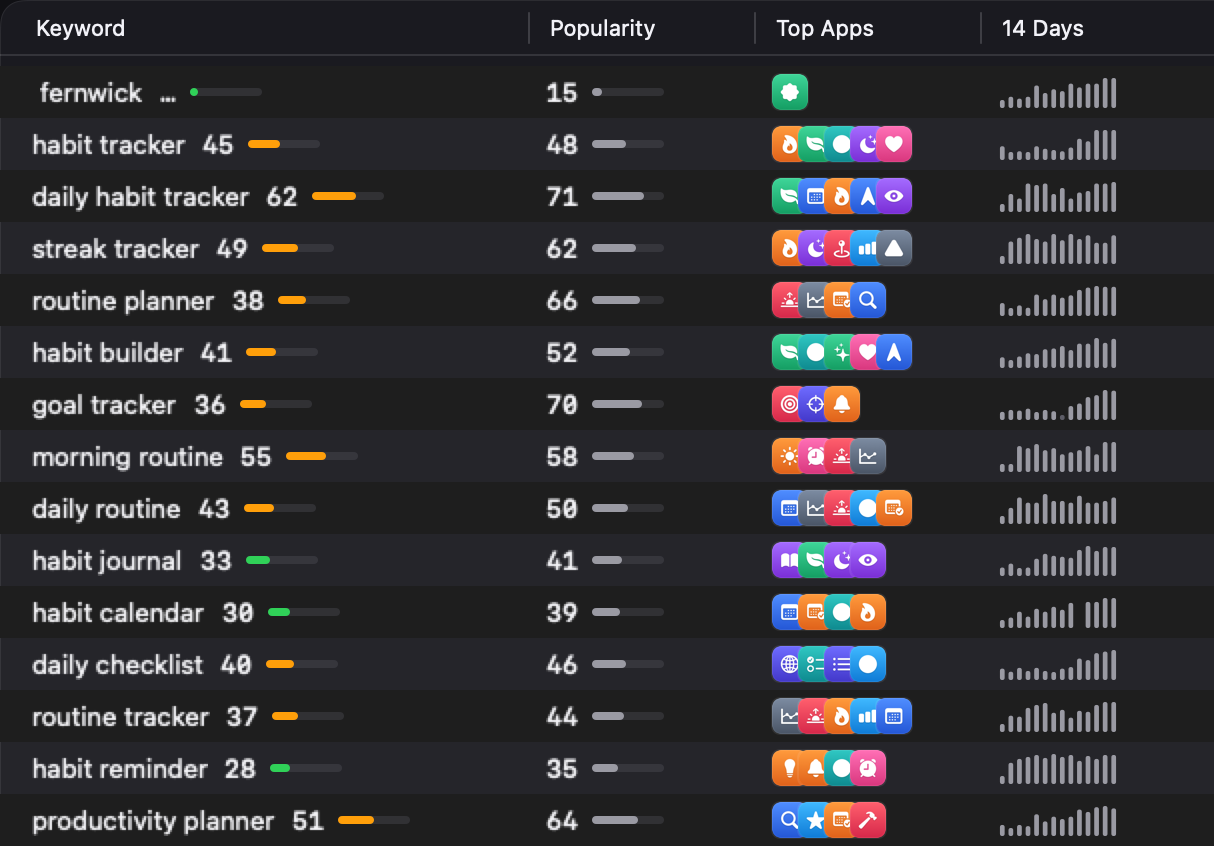
Free for your first app with a 14-day chart; Pro, Max and Agency chart every day since the first.
Next on the path: Why your app ranks differently in every country's App Store