Guides · Working for clients · 12 of 12
How to show a client what you did for their app
A client can check ranks, ratings and reviews themselves. A report of dated changes, each with what came after it, is a report they can check and believe.
The client asks what they got for last month’s invoice. You did a lot: a new subtitle, a round of keyword work, new screenshots for Germany, an eye on three competitors. Written as a list of tasks, it reads like effort. The client wants to know what happened to their app.
How do I show a client what I did for their app?
Give them facts they can check, each with its date, and set every number against the month before. A client can search the App Store and count down to their app, and read their own ratings and reviews. They can open App Store Connect (Apple’s website for managing apps) and see their downloads. A report built from those facts is one they can verify, so it is one they believe.
A report of effort, “researched 40 keywords” or “optimized the listing”, gives them nothing to check. It asks for trust instead of earning it.
A change counts with its date and what came after
Every change you made for the client goes in the report with its date. Beside it go the numbers from that date to the next change, and no further. If you shipped a new subtitle on the 3rd and new screenshots on the 17th, the subtitle owns the days from the 3rd to the 17th. After the 17th the days belong to both changes, and a report that keeps them apart gives neither change those days.
That rule protects you as much as the client. A busy month with a change every two days has no clean stretch to read, and the report should say so. A quiet month with one change and three clean weeks after it is the easiest month to report on. Did your last app update help? walks through the rule in detail.
Keep your work, outside events and competitors’ moves apart
Three kinds of thing land in a client’s month, and they belong in three separate lists:
- What you made for the app. The subtitle, the screenshots, the keyword field, the price change you advised.
- What happened from outside. A feature by Apple, a mention in the press, a holiday.
- What competitors did. A rival’s new version, its price cut, its new title.
Mixing them costs you twice. If Apple features the app in the month you changed the screenshots, and the feature sits in your list, the client credits your screenshots with the feature. The next month, with no feature, your work looks like a decline. Kept apart, the feature is good news you reported, and your screenshots stand on their own stretch.
Competitors’ moves are worth reporting even though they are nobody’s work on your side. A client wants to know that the app above them cut its price, and it explains a stretch that would otherwise look strange.
Against the period before
A number on its own says little. 1,020 downloads is good or bad depending on the month before. So every row of the summary carries two values: this period and the period of the same length before it.
When there is no reading for the period before, say so in words. A missing number printed as zero tells the client something fell to nothing, which never happened.
How to build the report by hand
- The dated list. Every change you made, every outside event, every competitor move you saw, each with its date, in the three lists above.
- The stretches. For each of your changes, the days until the next entry of any kind, and the numbers for that stretch: downloads a day, ratings gained, positions for the main searches at both ends.
- The summary. One table for the whole period against the period before: downloads, ratings gained, new written reviews, searches in the top 10.
- Your notes. A few sentences in your own words: what you did, what you saw, what you plan next month.
What is normal: a month where nothing moved. The report says the numbers held and names what you did anyway.
Do this today
Build last month’s table for one client, by hand, from your notes and App Store Connect.
- Write the dated list of what you changed for them last month.
- Add the outside events and competitor moves you know of, in their own lists.
- Fill in the summary table, this month against the month before, with “no reading” wherever a number is missing.
If writing the dated list takes longer than the rest, that is the part worth fixing first. A change written down the day it happens costs ten seconds.
In ASOblick
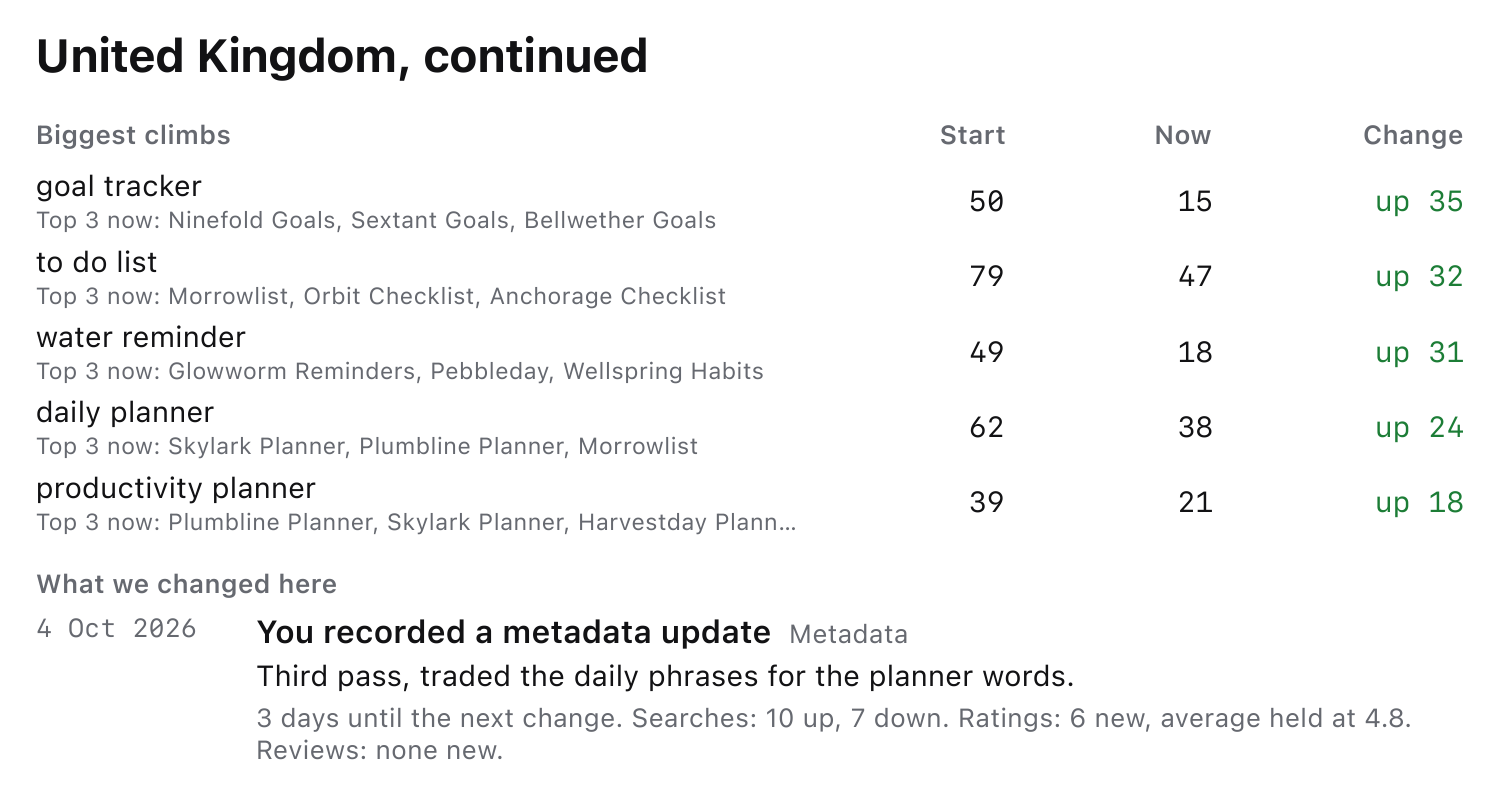
A client groups the apps you look after for one customer, and the menu at the left of the app strip shows one client’s apps or all of them. The Log records each app’s changes with their dates by itself. Export Report in the File menu prints a PDF for one app or one client, over the last 7, 30 or 90 days or last month. Its first page says it was prepared for the client by your agency, and sets the period against the period before, row by row; a number with nothing to compare says “no reading”. The changes are counted apart, as what was made for the app, what happened from outside and what competitors did, and under each change come the numbers from the Log for its stretch. Then come one part for each country where something happened, the words more common in 1 and 2 star reviews, yours and the competitors’, and the notes you type, in your own words. A colleague you invite to a client, or to your Team, sees the same client live on their own Mac, up to 10 people across your clients. The App Store Connect key and the sales figures stay on the Mac they were connected to. The agencies page shows the pages of a full report.
Clients, client reports and sharing are part of Agency.