Guides · What came after a change · 10 of 12
Did your last app update help? How to read what came after
Ranks, ratings and downloads move for many reasons. Read the stretch from one change to the next, with its dates, and you see what came after each change.
You shipped the update two weeks ago. Downloads look a little better, or a little worse, and someone asks whether the update worked. You open App Store Connect, look at a chart, and realise you are not sure what you are looking at.
How do I know if my app update helped?
You read what came after it, over the right stretch of days, and keep that reading apart from the reasons. Nobody outside your users’ heads can prove why a number moved. What you can do is set a record with dates beside the change: what the numbers were before, what they were after, and what else happened in between.
Numbers move for many reasons at once
In any two weeks, several things push on your ranks, ratings and downloads at the same time:
- Your own changes. A version, a price, a new title, new screenshots, an ad budget.
- Apple. A feature on the Today tab, a change to search, a new device in people’s hands.
- Your competitors. A rival’s relaunch, a price cut, a new app in your searches.
- The calendar. Weekends, holidays, the start of the year for a fitness app, the school term for a study app.
- Chance. One person with a following mentions you, or a burst of reviews lands after a bug.
A chart of downloads shows the sum of all of them. Reading it as the result of your update alone credits the update with everything that happened in those days.
A stretch ends at the next change
The rule that keeps a reading to one change: what came after a change is read from that change to the next thing that changed, yours or anyone else’s.
An example. You ship version 2.0 on 1 March and raise the price on 10 March. The days from 1 to 10 March belong to the update alone. From 10 March on, every number belongs to both changes, and no reading can split them. So the update’s stretch is nine days, not “since 1 March”.
An outside event closes a stretch the same way. If Apple features your app on 5 March, the update has four clean days, because anything that might explain a number makes the days after it a mixed reading.
Then compare like with like: the numbers in the stretch after the change against the stretch before it, from the previous change to this one. Downloads a day, not downloads in total, because two stretches are rarely the same length.
One day is noise
A stretch of a day or two says nothing. Positions move two or three places between days on their own, and downloads swing between a Tuesday and a Saturday. How long App Store Optimization takes shows how much a keyword moves when nothing changed. A change followed by another change the next day has no stretch of its own, and the reading is “not enough days”.
What is normal: a new version takes a day or two before it shows in the numbers, because people have to find it, download it and use it. A flat first week is common, and it is not a verdict.
How to keep the record by hand
A plain spreadsheet does it, one row per entry:
- The date of the change or the event.
- What it was. Your changes: a version and what it changed, a price, the title, subtitle or keyword field, screenshots, the description, the icon, an ad budget. Outside events: a feature by Apple, a competitor’s release, a mention somewhere.
- The stretch. The number of days until the next row.
- The numbers for that stretch. Downloads a day from App Store Connect’s analytics, your rating count at both ends, and your position for your three main searches at both ends.
The hard part is the second column. A change you did not write down is a change you cannot read later, and six months on nobody remembers which week the screenshots went up.
Do this today
Write the list of your last five changes, with their dates.
- Open your app’s page in the App Store and tap Version History. It lists every version with its date and release notes.
- Add anything else you changed: a price, screenshots, the title.
- Add the two outside events you remember, with the best date you can find.
- Sort by date and write the length of each stretch beside it.
Any stretch shorter than a week is a stretch you will struggle to read. Next time, leave more room between changes.
In ASOblick
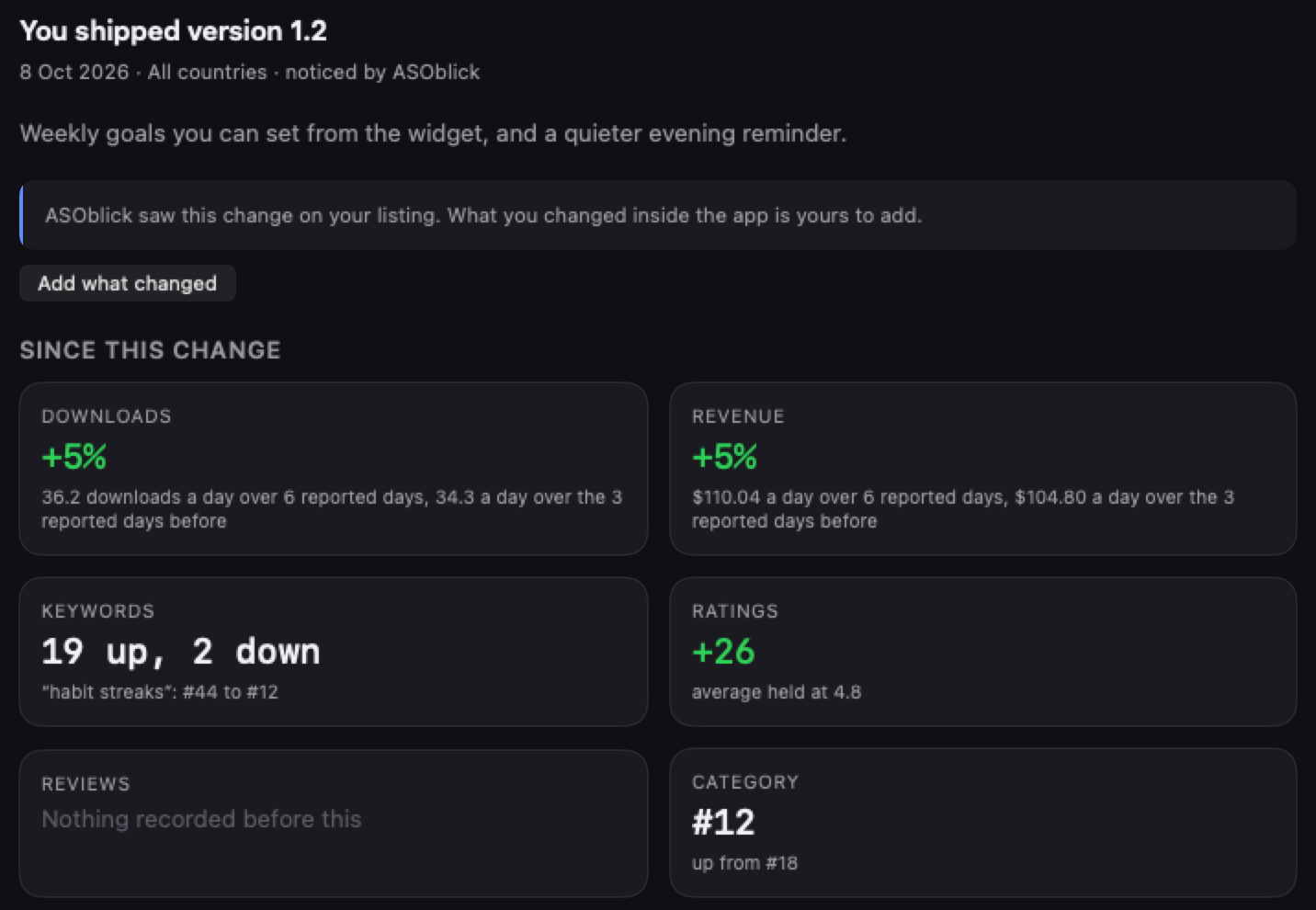
The Log writes your new versions, price changes and changes to your title, screenshots and description by itself, from the daily check, and dates every publish you record in the Workshop. Anything else, an icon, an ad budget, a mention somewhere, takes a line you type, from anywhere in the app with Command-L. Click an entry and the pane beside it shows what came after, in tiles: Downloads and Revenue a day with your sales connected, Keywords for how your tracked searches moved, Ratings with their average, Reviews for the written reviews that arrived, and Category for your category rank. Every number compares the stretch from this entry to the next entry of any kind with the stretch from the previous entry to this one, and the pane says how many days the stretch ran. The newest entry is measured up to today. A stretch under two days shows a sentence saying there was no room to read anything, in place of numbers. Pick one kind of change above the timeline, Metadata for instance, and every change of that kind lines up in a table with downloads a day before and after. Each entry sits beside the days that followed it, and the Log never says the entry is the reason the numbers moved.
The Log is read on Pro, Max and Agency, and records on every plan from the day you add an app.
Next on the path: How to check whether anyone searches for your app idea before you build