Guides · Before you build · 11 of 12
How to check whether anyone searches for your app idea before you build
The App Store's search box completes what shoppers start typing. Its suggestions, and the apps holding those searches today, show who you would be next to.
You have an idea, a free weekend and a feeling that people would want it. Before you spend the weekend, and the three months after it, there is a question you can answer in half an hour: does anyone go looking for this in the App Store, and who do they find when they do?
How can I tell whether anyone searches for my app idea?
Ask the App Store’s own search box. It completes what shoppers start typing, and the order of its completions is the closest public reading of what people type. Apple publishes no search volumes, for your idea or anyone’s.
What the search box tells you
Type the first words of your idea into the App Store’s search field and stop before you press search. A list of completions appears.
- The completions are searches people make. “Baby sleep” might offer baby sleep tracker, baby sleep sounds, baby sleep schedule. Each is a phrase shoppers type often enough for Apple to suggest it.
- The order carries meaning. The list is not alphabetical. Apple does not publish how it is worked out, and the closest public reading is that a completion near the top is typed by more people than one further down. How to pick App Store keywords goes further into reading that order.
- It completes short phrases. Type two or three words. A written-out sentence, such as “an app that helps parents track their baby’s sleep”, comes back with nothing, however popular the subject is.
That last point matters most, because an empty list can mean three different things:
- The request did not get through. A bad connection looks the same as silence.
- You asked in a shape the box never completes. A long phrase, a full sentence, a word nobody spells that way.
- Apple has nothing for those words. For a short everyday phrase, few people type it.
Only the third is a reading about demand. Try two or three other ways of naming the idea before you read silence as an answer.
What is normal: an idea that gets nothing under its own clever name and a long list under the name of the problem. People search for “sleep tracker”, not for what you plan to call it.
Who you would be next to
Demand is half the picture. The other half is who already answers those searches. For each completion, run the search and look at the first few apps.
- How many ratings they have. A top held by apps with a hundred thousand ratings each is a field where the leaders have years of downloads behind them. A top of apps with a few hundred ratings each is a different field.
- When they last changed. Each store page shows the app’s newest version and its date. A leader that has not shipped in two years is a different neighbour from one that ships every month.
- What their reviews ask for. The 1 and 2 star reviews of the leaders are a list of what that field leaves open. What people want from an app like yours, in your competitors’ 1 and 2 star reviews shows how to read them.
None of this says whether to build. It says what the store looks like today for someone who types those words, and where your app would stand in it.
The completions differ from country to country, because each country has its own App Store. If you plan to sell in one market first, look there.
Do this today
Give your idea half an hour and one table.
- Write three two-word ways of naming the idea, the way a stranger would type it, not the way you would pitch it.
- Type each into the App Store’s search field and write down the completions, in the order Apple shows them.
- For the two completions closest to your idea, run the search and write down the top three apps and how many ratings each has.
- Put it all in one table with today’s date.
The table is the start of your keyword list as well. The searches in it are the ones your listing will need on launch day.
In ASOblick
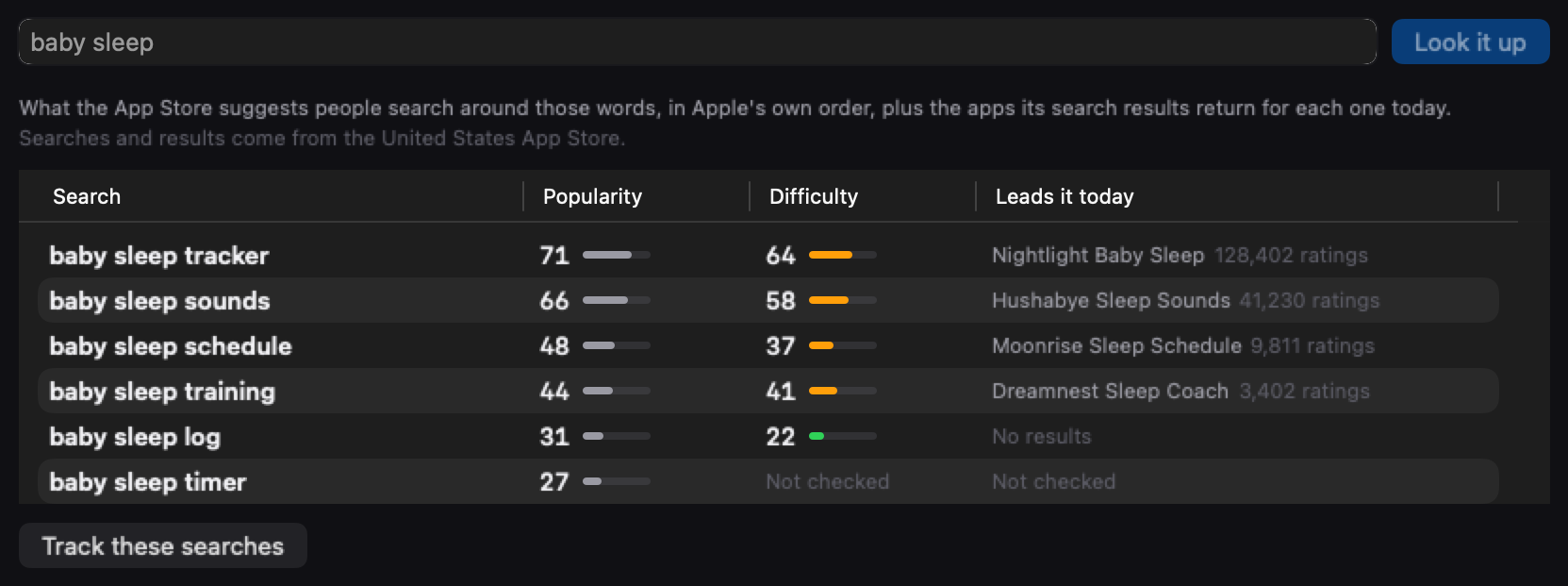
Type the idea in two or three words in Ideas, with no app added, and ASOblick asks the App Store’s search box what it suggests. It then runs up to six of those searches and reads their results, so one lookup sends up to seven requests to Apple. Each row shows a search in Apple’s order, its popularity and difficulty, both ASOblick’s own estimates and labelled so in their tooltips, and the app that leads it today with its rating count. A row reads Not checked when the request for that one search failed, and running the lookup again reads it fresh. When nothing comes back, the screen says which of three things happened: ASOblick could not reach the App Store, the words were a written-out description the box never completes, or the App Store returned no suggestions for them. Track these searches creates a planned app named after the idea with each search as one of its keywords. From then on their difficulty and top apps refresh daily. On launch day you click My App Is Live and pick your listing, the first rank check runs that minute, and every search carries over.
Five lookups a day on the free plan, and no daily cap on Pro, Max and Agency.
Next on the path: How to show a client what you did for their app