Guides · Your competition · 8 of 12
How to track what your competitors change in the App Store
A competitor's listing changes in five places anyone can see: version and release notes, price, title, screenshots and description. Keep a dated record.
A competitor shipped a new version three weeks ago, dropped its price and rewrote its title. You found out from a customer. By then the weeks in which you could have read what came after are gone, and nobody can collect them again.
How do I track what my competitors change in the App Store?
Look at their store pages on a schedule and write down every difference, with the date and the country. Apple does not tell you when another developer changes a listing. The record is yours to keep, and it is only as good as its dates.
What changes on a store page
A store page changes in a handful of places anyone can see:
- The version, with its release notes. The “What’s New” part of the page shows the newest version number, its date and the developer’s own words about it. App Store version numbers only go up.
- The price. Each country has its own price, in its own currency.
- The title and the subtitle. The name at the top and the line under it. A rewritten title is often a new keyword plan: a competitor that adds “habit tracker” to its title is going after that search.
- The screenshots. New pictures, a new order, a new first screenshot.
- The description. The long text under the screenshots.
Every one of them except the version can differ from country to country. A price belongs to one country’s store. A title, screenshots and a description belong to one language, so a competitor can rewrite its German page and leave its English one alone.
Where they rank above you
The other half of watching is position. For each of your main searches, in each country you sell in, some apps sit above yours. A competitor that climbs above you in the same week it changed its title is worth a dated note. The note records what came after the change. It never proves why.
The competitors you have not named
The apps that keep appearing in the top 10 of your searches are your competitors whether you track them or not. An app in the top 10 of one search is a neighbour. An app in the top 10 of several of your searches is after the same shoppers you are. A new app can reach those lists within weeks of its release, and you will not hear about it unless you look.
How to watch by hand
Once a week, give it half an hour.
- For each competitor, open its store page in each country you sell in. The address is apps.apple.com, the country’s two letters, then the app’s ID, for example apps.apple.com/de/app/id1234567890 for Germany.
- Write down the version and its date, the price, the title and subtitle, the first screenshot’s caption and the first line of the description.
- Compare with last week’s note. Write each difference with today’s date and the country.
- Run your three main searches and write down the apps above you, with their positions.
What is normal: two looks on the same day can disagree. Apple can serve an older copy of a page for hours after a change, so the old title in the morning and the new one in the afternoon is one change, not two. A difference you see on two different days is a real one.
The same goes for screenshots, in a way that catches people who save image addresses. Apple serves one picture from several servers and in several sizes, so the same screenshot can have two different addresses in two looks a minute apart. Compare the pictures, never their addresses.
Do this today
Find the competitors you are not watching yet.
- Run your three main searches in your main country.
- Write down the first ten apps of each.
- Circle every app that appears in at least two of the three lists and that you do not watch already.
Those circled apps go on your weekly look, beside the ones you already knew. What people want from an app like yours, in your competitors’ 1 and 2 star reviews covers what to read once they are on it.
In ASOblick
Track a competitor and ASOblick reads its store page with the daily check, in every country your app is checked in. A new version is written to your Log the first time it is seen, with its release notes in Apple’s words. A price, title, screenshot or description change is written once a reading on a later day, at least 12 hours on, shows it again, and the entry is dated to the day it was first seen. Screenshots are compared by the part of each address that names the picture, so a new server or a new size is never written as a change. For a description, ASOblick keeps that the text changed, not the text. The Competitors module shows what each competitor changed and when, its ratings with what it gained over a stated stretch, and the searches where it ranks above you, each with the day that run began. Under the competitors you track, it lists up to ten apps you do not track that are in the top 10 of at least two of your searches, with the searches each one is in, and Track as Competitor adds one with a click.
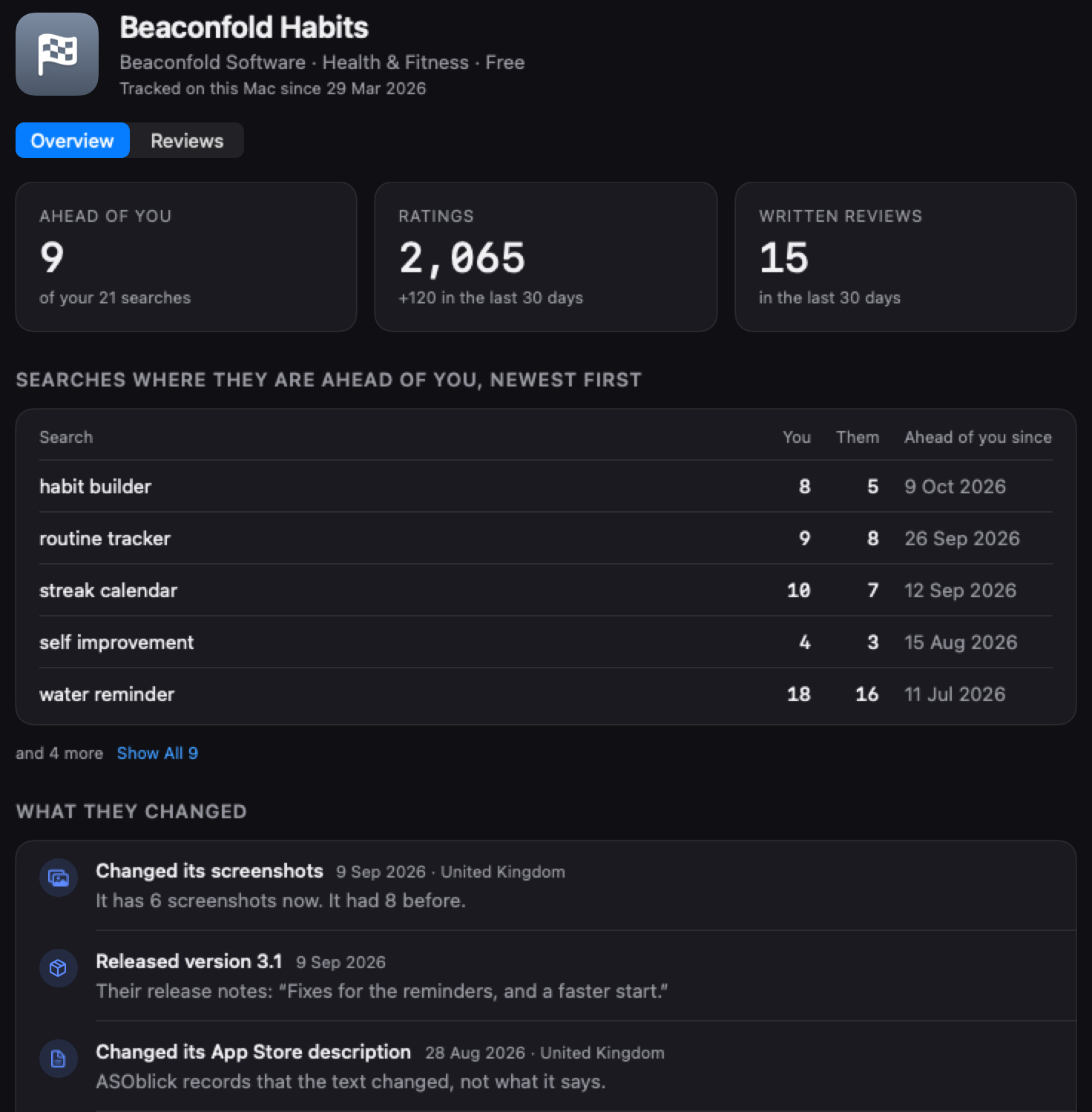
The Competitors module is part of Max and Agency.
Next on the path: What your users are asking for in your App Store reviews