Guides · Your own users · 9 of 12
What your users are asking for in your App Store reviews
Your reviews sit in a separate list for each country. A word that keeps coming back is the ask, and a version or a country can show where a fault lives.
You have forty reviews, maybe four hundred, and no afternoon to read them properly. App Store Connect shows them one country at a time, and the useful ones sit between the five-star thank-yous. Somewhere in there your users have written your next version for you.
How do I find what users are asking for in my reviews?
Read for the things they name, and count them. A single review asking for dark mode is a wish. The same request in twelve reviews over three months is the ask. The count is what turns a pile of opinions into a decision you can defend.
Two kinds of sentence carry most of the asks:
- The request. “I would like a widget”, “please add a week view”, “wish it synced with my iPad”. Many of these come in 4 and 5 star reviews, from people who like the app and want one more thing.
- The fault. “It crashes when I add a reminder”, “the widget stays blank”. These cluster in 1 and 2 star reviews, often right after a release.
A review’s stars and its text can point in different directions. A 4 star review that says “perfect if it had a week view” is a feature request with a good rating. A 1 star review can be about a charge on someone’s card that your app never touched. Read the text, then the stars.
Your reviews live in many lists
Apple keeps a separate list of written reviews for each country. In App Store Connect (Apple’s website for managing your apps), open your app, then Ratings and Reviews. Apple’s help puts it this way: “To view ratings or reviews for a specific country or region, choose the country or region from the menu on the top left.” An app on sale in thirty countries has thirty lists.
Most people who rate an app never write anything. They tap the stars and move on, so they count in your rating and never appear as a review. The written reviews are always the smaller set, and they are the only one that tells you why.
A version or a country can show where a fault lives
Every review carries the version it was written about and the country it came from. Both are clues.
- A version. When 1 and 2 star reviews pile up on one version and stop at the next, the fault lived in that version, and you know when it arrived.
- A country. When the reviews in one country name a word the others never use, look at what differs there: the translation, the price, the date format, a payment method.
What is normal: a quiet app gets a written review every few weeks, and a release brings a burst within days. A country where you have few downloads may have no written reviews at all. That says nothing about the people there.
How to read them by hand
- In App Store Connect, open Ratings and Reviews and pick your biggest country from the menu.
- Read the newest reviews first, and keep a tally: one row for each thing a review names (a feature, a screen, a device, a price), one mark per review.
- Beside each mark, write the stars and the version.
- Do the same for your second country.
Apple’s public review feed gives the same reviews in a raw list, newest first, with stars and version on each, 50 to a page. What people want from an app like yours, in your competitors’ 1 and 2 star reviews has its address. It works for your own app’s ID just the same.
Do this today
Read your last thirty written reviews, across your two biggest countries.
- Write down every request and every fault they name, one mark per review.
- Circle the three with the most marks.
- Beside each, write the versions and countries the marks came from, and today’s date.
Those three are your users’ agenda. Put them beside your own plan for the next version and see where the two lists meet.
In ASOblick
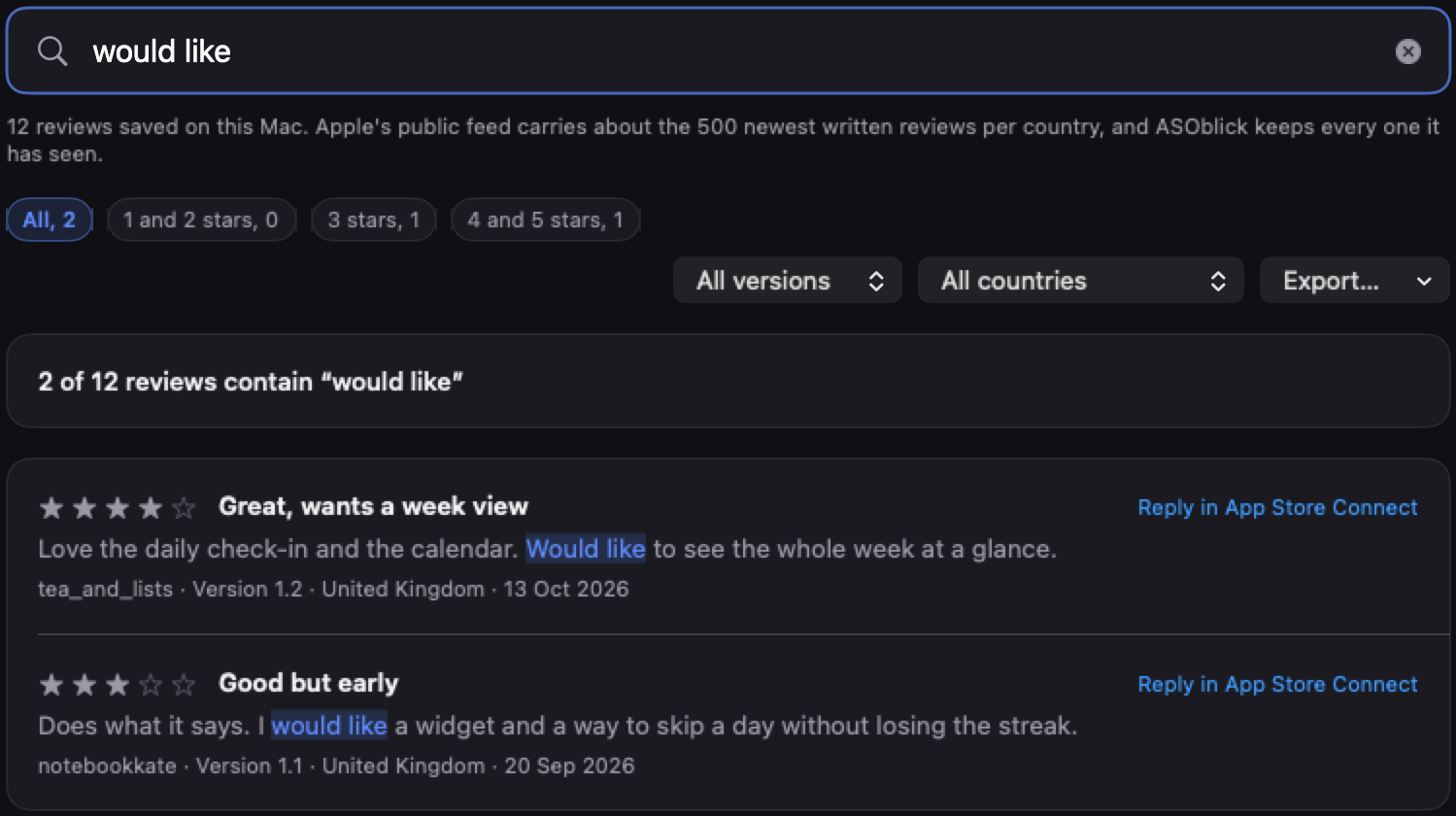
ASOblick reads Apple’s public review feed for your app once a day, in every country your ranks are checked in, and keeps every review it has seen on your Mac. The first read of a country takes about the 500 newest written reviews, and from then on the count grows past what the feed carries. All of them sit on one Reviews page. Type a word or a phrase and the list shows every review whose title or text contains it, with a line saying how many, so “would like” or “please add” gathers the reviews that use those words. Chips narrow the list to 1 and 2 stars, 3 stars, or 4 and 5 stars, each with its count, and two menus narrow it to one version or one country. With nothing typed and at least 20 reviews in each star group, a table lists the words used by a larger share of your 1 and 2 star reviews than of your 4 and 5 star ones. Check for New Reviews reads the feed whenever you click it. The rating above the list is Apple’s rating for the country you are looking at, and Reply in App Store Connect beside each review opens the place where replies are written. A review that arrives after the first read also shows in the feed on the Keywords page, its star in red for 1 and 2 stars and in green for 4 and 5.
Free for your first app.
Next on the path: Did your last app update help? How to read what came after